<link href="https://fonts.googleapis.com/css2?family=Caveat:wght@500;700&family=JetBrains+Mono:wght@400;500;600&family=Plus+Jakarta+Sans:wght@600;700;800&display=swap" rel="stylesheet" /> Skip to main contentEngineering Courses, Mentoring & Jobs | EveryEng
SolidWorks Assembly Design banner

SolidWorks Assembly Design

SolidWorks Assembly Design banner
Self-paced Advanced

SolidWorks Assembly Design

4(1581)
1285 views
₹ 799
194 min
Anytime
English
1285 views
Team EveryEng
Team EveryEngMechanical Engineering
  • 7-day money-back guarantee
  • Lifetime access
  • Certificate of completion
Volume pricing for groups of 5+

Why enroll

Participants join the SolidWorks Assembly Modeling course to gain practical skills in building and managing complex 3D assemblies used in real-world engineering projects. It helps them improve their design efficiency, understand component relationships, and enhance job readiness for roles in mechanical design and product development.

Is this course for you?

You should take this if

  • You work in Oil & Gas Upstream or Aerospace
  • You're a Civil & Structural / Mechanical Engineering professional
  • You have 3+ years of hands-on experience in this field
  • You prefer self-paced learning you can revisit

You should skip if

  • You're new to this field with no prior experience
  • You need a different specialisation outside Civil & Structural
  • You need live interaction with an instructor

Course details

The SolidWorks Assembly Modeling course is designed to equip participants with a strong foundation in creating and managing assemblies using SolidWorks software. It begins with an introduction to the assembly environment, interface, and essential tools. Participants will learn how to insert components, apply mates, and define relationships to accurately position parts within an assembly. The course also covers techniques for handling complex assemblies efficiently, including sub-assemblies and configuration management. Learners will explore tools for interference detection, collision checking, and assembly validation to ensure design accuracy. Advanced topics such as motion simulation and basic assembly analysis are also introduced. Emphasis is placed on improving productivity through best practices and design intent. Participants will gain hands-on experience through real-world examples and practical exercises. Additionally, the course includes guidance on creating assembly drawings and bill of materials (BOM). By the end of the course, learners will be able to build, analyze, and document assemblies that meet industry standards. This course is ideal for students, engineers, and professionals looking to enhance their 3D assembly modeling skills.

Course suitable for

Key topics covered

  • Open Bearing Assembly

  • Closed Bearing Assembly

  • Four Bar Mechanism

  • Plummer Block Assembly

  • CONNECTING ROD

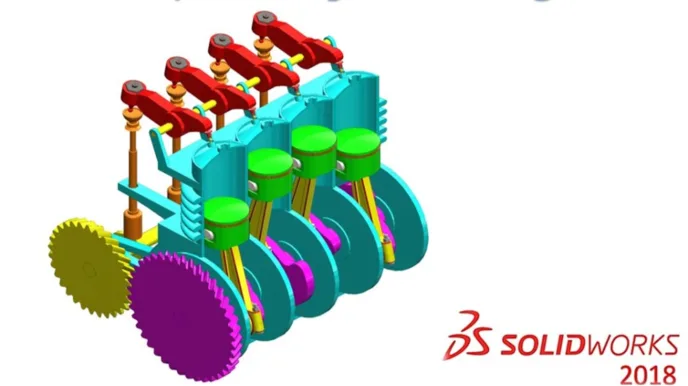
  • Four Cylinder Engine

  • Knuckle Joints

  • Animation in SOLIDWORKS

Course content

The course is readily available, allowing learners to start and complete it at their own pace.

8 lectures3 hr 14 min
  1. Open Bearing Assembly
    14 min
  2. Closed Bearing Assembly
    14 min
  3. Four Bar Mechanism
    15 min
  4. Plummer Block Assembly
    56 min
  5. CONNECTING ROD
    32 min
  6. Four Cylinder Engine
    31 min
  7. Knuckle Joints
    25 min
  8. Animation in SOLIDWORKS
    7 min

Opportunities that await you!

Skills & tools you'll gain

SolidWorks

Career opportunities

₹799

Access anytime

Questions and Answers

A: The tell is orientation flips plus overdefinition only after a full rebuild. Symmetric mates are sensitive to reference loss, and when paired with in-context sketches, the mate solver can satisfy constraints in multiple ways until a forced solve collapses it. Lightweight loading delays cause missing references, not flipped orientation. Pattern instance order changes usually break mates outright. Flexible subassemblies changing state don't create circular definitions by themselves.

A: The boundary is temporal. Interference detection checks static snapshots unless motion with contact is solved finely. Fast-moving parts can pass through between steps. Static overlap is exactly what the tool checks. Knit gaps and suppression state are model hygiene issues but still evaluated at the snapshot.

A: The gating step is resolving lightweight parts before any spatial check. Interference on partial data gives false confidence. Locking mates comes after geometry is fully loaded. Mass properties depend on resolved bodies and come later.

A: The number is driven by diameter in meters. T = 0.15 × 140,000 × 0.02 gives 420 N·m. Pitch diameter use drops torque incorrectly. Safety factor is handled on preload selection, not reapplied. Radius halves the lever arm and the torque.