Skip to main contentEngineering Courses, Mentoring & Jobs | EveryEng
Analyse Composite Materials using ANSYS banner

Analyse Composite Materials using ANSYS

Analyse Composite Materials using ANSYS banner
Self-paced Beginner

Analyse Composite Materials using ANSYS

4(1581)
22 enrolled
2104 views
FREE
8 min
Anytime
English
2104 views
Team EveryEng
Team EveryEngMechanical Engineering
  • Lifetime access
  • Certificate of completion
  • Foundational Learning
  • Access to Study Materials

Why enroll

Participants join this course to gain practical, industry-relevant skills in analyzing advanced composite materials using ANSYS. Many engineers and students are eager to understand how lightweight, high-strength materials behave under real-world conditions, especially in industries like aerospace and automotive. This course helps them build confidence in modeling and simulation, enabling them to predict performance, improve designs, and reduce failure risks. It is also valuable for those looking to enhance their career opportunities by adding in-demand CAE and simulation skills to their profile, making them more competitive in the job market.

What enrolled engineers say

5 verified reviews
  • Feb 25, 2026

    At first glance, the topics looked familiar, but the depth surprised me. The course went beyond just clicking through ANSYS menus and actually touched on how laminate theory shows up in real aerospace structures, like wing skins and stiffened panels. Ply orientation effects and the use of failure criteria such as Tsai‑Wu were handled in a way that connects reasonably well to how preliminary sizing is done in industry before allowables are applied. One challenge was getting comfortable with the composite layup definition and meshing strategy in ANSYS Mechanical. Layered solids versus shell elements can be confusing at a beginner level, and a couple of edge cases—like free‑edge stresses and load transfer between plies—aren’t obvious until results start looking odd. That mirrors reality, though, since FEA often hides these pitfalls. What stood out was the practical takeaway on setting up load cases and interpreting failure indices rather than just looking at stress plots. In aerospace programs, this directly impacts weight margins and downstream certification discussions. Compared to hand calculations, the workflow here showed where FEA adds value and where it can mislead if assumptions are weak. It definitely strengthened my technical clarity.

    Merle M. Verified
  • Feb 25, 2026

    This course turned out to be more technical than I anticipated. From a senior aerospace perspective, the coverage of laminate layup definition and ply orientation in ANSYS Mechanical was useful, especially when tied back to classical laminate theory rather than treating the software as a black box. The sections touching on failure criteria like Tsai‑Wu and how they show up in post‑processing were closer to what gets used on aircraft secondary structures than many beginner courses manage. One challenge was dealing with mesh sensitivity on layered shell elements. Getting reasonable interlaminar stress trends without over‑refining the model took some trial and error, and that’s an edge case that often bites teams new to composites. Material property definition was another sticking point; in industry, validated allowables usually come from test databases, not textbook values, so the gap was noticeable. A practical takeaway was a cleaner workflow for building ply stacks and checking load paths under combined bending and in‑plane loads, which matters for panels and fairings. Compared to industry practice, it’s simplified, but the system‑level implications are clear. I can see this being useful in long‑term project work.

    Sateesh Kumar Y. Verified
  • Feb 25, 2026

    Initially, I wasn’t sure what to expect from this course. Coming from an aerospace background, most exposure to composites had been theoretical, so the gap was always in actually setting things up in ANSYS. The sections on ply orientation, laminate stacking sequences, and how they affect stiffness were especially relevant to aircraft skin and control surface design. Working through failure criteria like Tsai-Wu and understanding how ANSYS reports layer-by-layer stresses helped connect analysis outputs to real aerospace allowables. One challenge was getting comfortable with the ANSYS interface for composites, particularly defining material properties and coordinate systems correctly. A small mistake there easily throws off results, and it took a bit of trial and error to trust the setup. That struggle was useful though, since it mirrors what happens on real projects with tight timelines. A practical takeaway was learning a repeatable workflow for modeling composite panels under in-plane loads and bending, which is directly applicable to preliminary sizing of aerospace structures. That knowledge filled a gap between design assumptions and simulation reality. The content felt aligned with practical engineering demands.

    kirankirk Verified

Is this course for you?

You should take this if

  • You work in Aerospace
  • You're a Mechanical Engineering professional
  • You prefer self-paced learning you can revisit

You should skip if

  • You need a different specialisation outside Mechanical Engineering
  • You need live interaction with an instructor

Course details

This course is designed to equip participants with the knowledge and skills to effectively analyze composite materials using ANSYS software. Composite materials, consisting of two or more distinct constituents with different properties, are widely used in aerospace, automotive, marine, and civil engineering applications due to their lightweight, high strength-to-weight ratio, and tailored properties. By mastering the fundamentals of composite material analysis, participants will learn how to model, simulate, and analyze the behavior of composite structures under various loading conditions using ANSYS Mechanical.

Course suitable for

Key topics covered

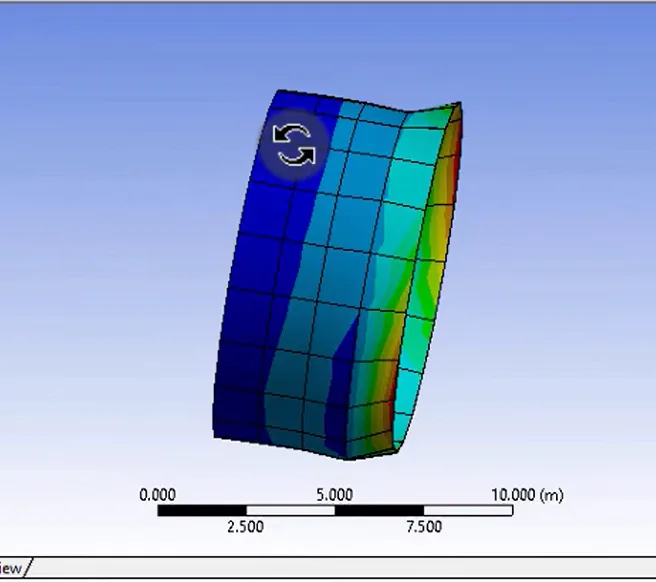
  • Learn to create and simulate the composite tube in ANSYS.

Course content

The course is readily available, allowing learners to start and complete it at their own pace.

1 lectures8 min
  1. Simulation of composite tube
    8 min

Opportunities that await you!

Skills & tools you'll gain

ANSYS

Career opportunities

Why people choose EveryEng

Industry-aligned courses, expert training, hands-on learning, recognized certifications, and job opportunities-all in a flexible and supportive environment.

What learners say about this course

MILIND AMBARDEKAR
MILIND AMBARDEKAR Self employed
Feb 25, 2026

Initially, I wasn’t sure what to expect from this course. Coming from an automotive background, CFD had always felt a bit like a black box beyond post-processing plots. The sections on the Navier–Stokes equations and finite volume discretization helped connect the math to what’s actually happening in the solver. Seeing how grid generation and boundary layer resolution affect results made a lot of sense, especially when thinking about under-hood airflow and thermal management in automotive applications. One area that stood out was the discussion around convergence and stability. A real challenge during the assignments was dealing with a case that simply wouldn’t converge because of poor meshing near walls. That was frustrating, but also realistic. In aerospace projects, especially around external aerodynamics and airfoil analysis, the same issues show up if y+ and turbulence modeling aren’t handled carefully. A practical takeaway was learning a basic checklist before trusting results: mesh quality, residual trends, and sensitivity to boundary conditions. That’s already been applied to a cooling flow study at work. Overall, it felt grounded in real engineering practice.

sandeep saroj
sandeep saroj
Jan 4, 2026

Valuable content

Sayali Shinde
Sayali Shinde CR Manager
Aug 18, 2026

Good Course

Avatar icon
Sateesh Kumar Yadav PhD
May 3, 2026

Needed material that would stand up to peer review, and this mostly did, even though it’s a CAD course not code. The AWM bolt assembly chapter where he constrains the lugs and then shows the tolerance stack before adding mates felt like reading a clean PR in a shared repo; you see the intent, not just clicks. I liked the aside on configurations for barrel lengths and how that mirrors feature flags in prod, though the config table example could’ve gone a bit further into naming conventions. There’s a steady comparison of legacy drawings versus parametric workflows that maps well if you live between old arch docs and modern CI, infra, obs, even k8s mental models. wasn't sold on the trigger pack segment since the dimensions stay a bit hand-wavy, but the exploded view timing was right. It’s helped settle some fuzzy calls around when to lock dimensions versus keep them flexible, which tends to bite during PR review.

FREE

Access anytime

Questions and Answers

A: The boundary is the reference axis, not symmetry. Symmetric stacks cancel bending-extension coupling, but sign errors still flip shear coupling if the angle reference is wrong. Without instrument datasheets, axis intent is all you have. You confirm whether the drawing's X-axis matches ANSYS global X before touching ply order.

A: The threshold is the failure mode. Coupon data alone doesn't cover load introduction, free-edge, or ply drop effects. The guidance pushes you to one higher level of test that exercises the same failure mechanism you're claiming in ANSYS.

A: The number is 135 GPa. For a single 0° ply loaded in its 1-direction, Ex equals E1 under plane stress. Poisson terms affect coupling, not the axial modulus you read back.

A: The boundary is cycles, not peak load. Trending divergence under repeat loading points at damage accumulation, something a limit-load pass doesn't clear, especially without full build records.