<link href="https://fonts.googleapis.com/css2?family=Caveat:wght@500;700&family=JetBrains+Mono:wght@400;500;600&display=swap" rel="stylesheet" /> Skip to main contentEngineering Courses, Mentoring & Jobs | EveryEng
Design Water Bottle in SolidWorks banner

Design Water Bottle in SolidWorks

Design Water Bottle in SolidWorks banner
Self-paced Beginner

Design Water Bottle in SolidWorks

4(1581)
26 enrolled
1404 views
FREE
22 min
Anytime
English , Hindi
1404 views
Team EveryEng
Team EveryEngMechanical Engineering
  • Lifetime access
  • Certificate of completion
  • Foundational Learning
  • Access to Study Materials
Volume pricing for groups of 5+

Why enroll

By the end of the course, students will have developed a comprehensive understanding of water bottle design principles and proficiency in using SolidWorks to bring their designs to life. They will be equipped with the knowledge and skills necessary to pursue careers in product design, engineering, and manufacturing, with a focus on sustainable and innovative solutions for the consumer goods industry.

What enrolled engineers say

4 verified reviews
  • Feb 25, 2026

    Initially, I wasn’t sure what to expect from this course. As someone who uses SolidWorks on and off at work, the basics were familiar, but the focus on an actual consumer product helped fill a gap. The sections on sketch constraints and parametric modeling were more useful than expected, especially when adjusting bottle diameters and heights without breaking the model. Lofted features and the Shell tool were also covered in a practical way, which tied directly into wall thickness and weight considerations. One challenge was getting clean lofts between profiles without surface errors. That took a few tries, and the explanation around guide curves helped, even if it didn’t click immediately. Another useful topic was applying draft angles and fillets with manufacturing in mind, which isn’t always emphasized in beginner material. A practical takeaway was learning a repeatable workflow for going from a rough sketch to a manufacturable part. That’s already been applied on a small internal project where we mocked up a branded bottle for a client pitch. The course didn’t overreach and stayed grounded. Overall, it felt grounded in real engineering practice.

    Sateesh Kumar Y. Verified
  • Feb 25, 2026

    At first glance, the topics looked familiar, but the depth surprised me. For a beginner course, it went beyond just sketch-and-extrude and spent real time on features like lofts for the bottle body and shell thickness control, which are critical in consumer products. The discussion around fillets and draft angles tied in well with injection molding constraints, something often skipped at this level. One challenge was keeping feature order clean while iterating on the bottle profile. A small change in the initial sketch caused downstream rebuild errors, which mirrors real SolidWorks headaches on larger assemblies. Working through that reinforced why parametric intent matters, even for something as simple as a water bottle. Compared to industry practice, the course didn’t dive deeply into tolerance stack-ups or material shrink rates, but it at least flagged those edge cases so beginners know they exist. A practical takeaway was learning how to balance aesthetics with manufacturability, especially when optimizing wall thickness to avoid sink marks while keeping weight down. From a system-level view, it helped connect CAD decisions to tooling and production realities. It definitely strengthened my technical clarity.

    Mirthul S. Verified
  • Feb 25, 2026

    At first glance, the topics looked familiar, but the depth surprised me. The course walks through core SolidWorks workflows like parametric sketching and feature-based modeling, then quickly gets into more practical areas such as lofted surfaces, shell features, and applying draft angles for manufacturability. Seeing these steps applied to a water bottle was useful, since it’s a deceptively simple part with a lot of edge cases. One challenge was managing loft transitions around the neck and cap interface. Small sketch inconsistencies caused rebuild errors, which mirrors what happens in real projects when upstream geometry isn’t constrained properly. Another area that stood out was the discussion around wall thickness and fillets; thin sections behaved differently once the shell feature was applied, something that often causes issues in injection-molded parts. Compared to industry practice, the course kept things grounded. It didn’t overpromise simulation or fancy surfacing, but instead focused on getting a clean, editable model that could survive design changes. A practical takeaway was learning to apply draft and parting considerations early, rather than treating them as a final cleanup step. Overall, it felt grounded in real engineering practice.

    Dipansh S. · Mechanical Design Intern Verified

Is this course for you?

You should take this if

  • You work in All Domains
  • You're a Mechanical Engineering professional
  • You prefer self-paced learning you can revisit

You should skip if

  • You need a different specialisation outside Mechanical Engineering
  • You need live interaction with an instructor

Course details

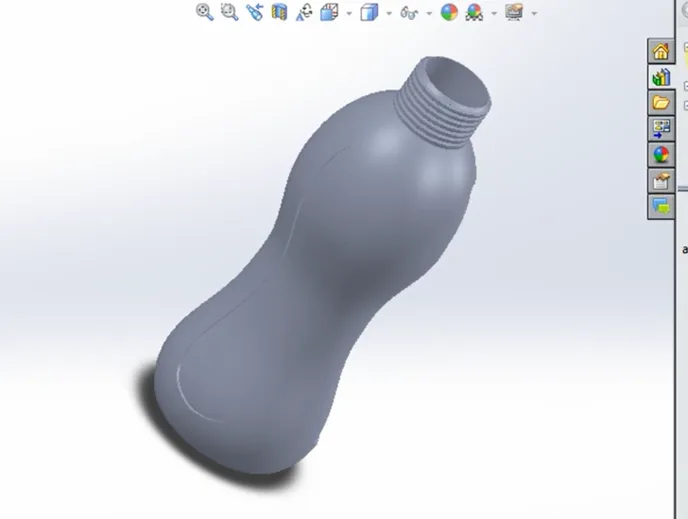
This course is designed to equip students with comprehensive knowledge and practical skills in water bottle design using SolidWorks, a leading computer-aided design (CAD) tool widely used in product development. Participants will begin with the fundamentals of CAD modeling, learning essential tools, sketching techniques, and feature creation. The course then focuses on designing water bottles by exploring concepts such as ergonomics, material selection, and aesthetic design. Students will gain hands-on experience in creating 3D models, assemblies, and detailed engineering drawings.In addition, the course covers advanced topics like surface modeling, rendering, and simulation to optimize product performance and appearance. Learners will understand manufacturing considerations, including injection molding and prototyping methods. Real-world projects and case studies will help participants apply their knowledge to practical scenarios. By the end of the course, students will be able to design efficient, functional, and visually appealing water bottles ready for production. This course is ideal for beginners and aspiring product designers looking to build a strong foundation in CAD-based product design.

Course suitable for

Key topics covered

  • Bottom part of the Bottle

  • Creating shell and outer design

  • Sketching And Smart Dimension

  • Neck Finishing and Material Selection

Course content

The course is readily available, allowing learners to start and complete it at their own pace.

4 lectures22 min
  1. Bottom part of the Bottle
    5 min
  2. Creating shell and outer design
    5 min
  3. Sketching And Smart Dimension
    4 min
  4. Neck Finishing and Material Selection
    8 min

Opportunities that await you!

Skills & tools you'll gain

SolidWorks

Career opportunities

+21 enrollmentsin the last 30 days
+10,400% vs prior 150-day average

FREE

Access anytime

Questions and Answers

A: A looks boring, which is why it gets skipped. If the gauge is drifting low, your apparent pass is fiction, and the longer dwell times are a clue. B feels decisive, but changing acceptance pressure on the floor without an MOC breaks the test basis. C is how marginal designs escape into production; trends don't fix themselves. D confuses failure modes — leaks at the neck are about hoop stress and creep, not impact.

A: A sounds pedantic; mold finishes do live on part drawings in plastics. C might be true in some markets, but nothing here proves it. D is cosmetic. B is where the physics bite — draft on what should be a controlled sealing surface shifts contact stress and shows up later as marginal leak results.

A: A feels intuitive but drops section modulus where hoop stress is highest. C is tempting for schedules, but higher temperature moves you further into the creep regime and muddies comparison. D misses that functional failure comes long before burst. B addresses the local stress riser that FEA usually flags red in these bottles.

A: A comes straight from σ = p·r/t, and the geometry fits the assumption. B sneaks in material behavior to dodge arithmetic — redistribution doesn't halve basic membrane stress. C doubles radius by mistake. D applies a safety factor before you've even checked allowable, a classic spreadsheet habit.