Analysis of Simply Supported Beam with UDL using Ansys APDL
Analysis of Simply Supported Beam with UDL using Ansys APDL

- Lifetime access
- Certificate of completion
- Foundational Learning
- Access to Study Materials
Why enroll
What enrolled engineers say
At first glance, the topics looked familiar, but the depth surprised me. The walkthrough of a simply supported beam with UDL in ANSYS APDL was basic in theory, yet it forced a more disciplined setup than what many of us do out of habit. In aerospace work on wing secondary structures and in automotive chassis rail analysis, these beam assumptions show up more often than we like to admit, especially early in concept phases. One challenge was translating textbook boundary conditions into APDL commands without accidentally over‑constraining the model. The course highlighted that edge case well—how a “simple support” in theory can quietly become fixed if you’re not careful with DOFs. That’s something I’ve seen cause stiffness errors in both fuselage floor beams and ladder-frame automotive designs. A practical takeaway was the parametric definition of load intensity and span. That approach mirrors industry practice when running quick load sweeps before committing to detailed shell or solid models. It also made the system-level implication clear: even a small modeling shortcut at the beam level can cascade into bad load paths later in an assembly. The examples stayed grounded, and the APDL focus helped reinforce why automation still matters despite modern GUIs. It definitely strengthened my technical clarity.
Coming into this course, I had some prior exposure to the subject, mostly from hand calculations and black‑box FEA runs at work. What was missing was a clear link between theory and how to actually set it up in ANSYS APDL. The walkthrough on simply supported beams under UDL helped close that gap. The examples felt relevant to things I see in practice, like checking load paths in an automotive ladder frame cross‑member or doing first‑pass sizing on an aerospace wing spar. Seeing how boundary conditions and UDLs are defined in APDL, rather than just clicking through Workbench, was useful. One challenge was getting comfortable with the APDL syntax and understanding why a small mistake in constraints completely changes the bending moment diagram. That took a bit of trial and error. A practical takeaway was learning how to parametrize beam length and load so results can be quickly rerun for different cases. That’s something I can apply right away for quick sanity checks before heavier models. It’s a beginner course, but it filled a real knowledge gap for scripting-based analysis. Overall, it felt grounded in real engineering practice.
This course turned out to be more technical than I anticipated. Even at a beginner level, it went straight into how a simply supported beam with a UDL is actually set up and solved in ANSYS APDL, not just the theory from textbooks. Coming from automotive structures work, the beam modeling felt very similar to early chassis rail studies, and the same logic clearly applies to aerospace components like wing spars under distributed loads. One challenge was getting comfortable with APDL syntax, especially defining boundary conditions correctly at the supports and applying the UDL without over‑constraining the model. A small mistake there throws off deflection results quickly. The walkthrough helped close a knowledge gap around how BEAM elements behave compared to hand calculations. A practical takeaway was learning how to build a reusable, parametric APDL script that outputs deflection and bending stress directly. That’s already been useful for quick checks before running heavier FEA models on real projects. The content felt aligned with practical engineering demands.
Your instructor
Team EveryEng
Engineer
Mechanical Engineering
Is this course for you?
You should take this if
- You work in Aerospace or Automotive
- You're a Civil & Structural / Mechanical Engineering professional
- You prefer self-paced learning you can revisit
You should skip if
- You need a different specialisation outside Civil & Structural
- You need live interaction with an instructor
Course details
Course suitable for
Key topics covered
Course content
The course is readily available, allowing learners to start and complete it at their own pace.
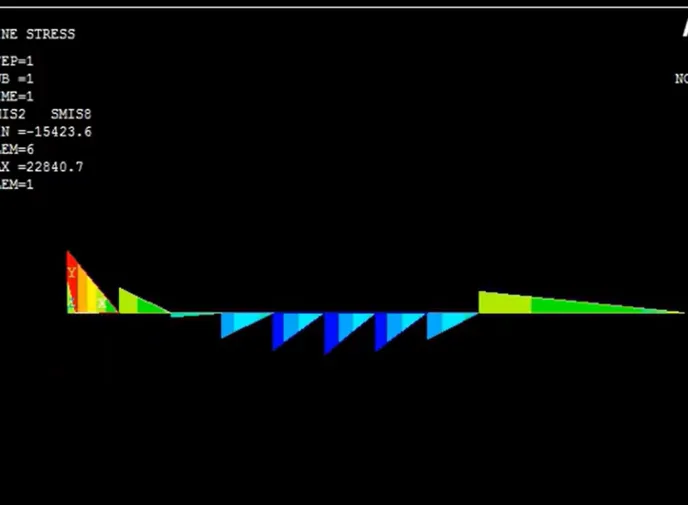
- Shear Force and Bending Moment Diagram5 min
- Modeling of beam6 min
Opportunities that await you!
Skills & tools you'll gain
Career opportunities
Why people choose EveryEng
Industry-aligned courses, expert training, hands-on learning, recognized certifications, and job opportunities-all in a flexible and supportive environment.


 Aug 29, 2026