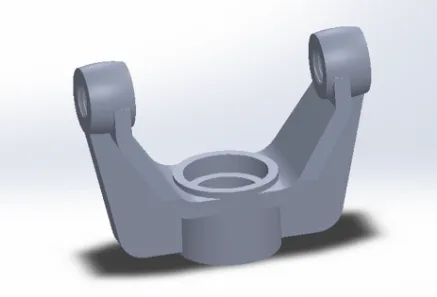
Design a fork in Swivel Bearing in SOLIDWORKS
- Lifetime access
- Certificate of completion
- Foundational Learning
- Access to Study Materials
Why enroll
What enrolled engineers say
Initially, I wasn’t sure what to expect from this course given it’s positioned as beginner-level. The content focuses on modeling a fork with a swivel bearing in SOLIDWORKS, but what stood out was how clearly it exposed load paths and constraint logic, which are topics that come up all the time in aerospace structures. Concepts like bearing load transfer and tolerance stack-up were familiar from aircraft hinge and landing gear work, even if the application here is more industrial. One challenge was mentally mapping catalog bearing data to the CAD model. Translating axial vs. radial load assumptions into mates and clearances took a bit of iteration, especially when considering misalignment edge cases that would be unacceptable in flight hardware. The course doesn’t go deep into fatigue life or certification-style safety factors, but it does encourage thinking about stress risers around fillets, which aligns with aerospace fatigue practice. A practical takeaway was building the fork parametrically so geometry can adapt to different bearing sizes without breaking downstream features. In industry, that kind of flexibility matters at the system level when requirements change late. Overall, it felt grounded in real engineering practice.
This course turned out to be more technical than I anticipated. Even though it’s positioned as beginner, the fork-with-swivel-bearing example touches on design concerns that show up in aerospace hardware, especially around load paths and fatigue life at filleted transitions. The walkthrough in SOLIDWORKS forced some discipline around how bearing seats, shoulders, and clearances are modeled, which is closer to how we’d treat a flight-control bracket than a hobby part. One challenge was keeping the swivel bearing properly constrained without over-defining mates. That’s a common CAD pitfall, and here it highlighted an edge case where the model looks fine but would bind once tolerances stack up. In industry, especially in aerospace, that tolerance stack-up can kill you during assembly or drive unexpected wear, so seeing it early was useful. The course also hinted at system-level implications—how misalignment in the fork affects downstream components, not just the bearing itself. Compared to aerospace practices, the safety factors and material discussion were light, but that’s expected at this level. A practical takeaway was a cleaner approach to modeling bearing interfaces so they’re FEA-ready later. It definitely strengthened my technical clarity.
This course turned out to be more technical than I anticipated. Even though it’s labeled beginner, the fork and swivel bearing geometry forces you to think about load paths and constraint management, which is very much an aerospace mindset. The sections on bearing alignment and clearance stacking reminded me of issues we see in flight-control linkages, where a small misalignment can turn into accelerated wear or unexpected friction. One challenge was keeping the model robust when changing fork width or pin diameter. A few features were overdefined early on, and rebuilding the design intent took some trial and error. That’s a realistic pain point, and it mirrors what happens when CAD models don’t anticipate downstream changes. From a practical standpoint, the biggest takeaway was how to set up mates and reference geometry so the swivel bearing motion stays predictable. In industry, especially in aerospace structures, that’s critical for fatigue life assumptions and fail-safe behavior. The course doesn’t go deep into GD&T or formal stress analysis, but it does hint at edge cases like off-axis loading and interference during rotation. Overall, it felt grounded in real engineering practice.
Your instructor
Team EveryEng
Engineer
Mechanical Engineering
Is this course for you?
You should take this if
- You work in Manufacturing & Industrial
- You're a CAD & Analysis / Mechanical Engineering professional
- You prefer self-paced learning you can revisit
You should skip if
- You need a different specialisation outside CAD & Analysis
- You need live interaction with an instructor
Course details
Course suitable for
Key topics covered
Course content
The course is readily available, allowing learners to start and complete it at their own pace.
- Swivel Design9 min
- Swivel Design11 min